The right company.
Discover businesses that match your criteria, or assess companies already on your list.
Research-led sales outreach
Find the right people to talk to.
ESI discovers companies that fit your offering, finds the right people, and delivers professional outreach grounded in research. Start with a target list or let ESI help you build one.
Precise research. Relevant people. Quality conversations.
“We’re opening our second location.”
A growing operation may need a simpler way to keep its teams and processes aligned.
“How are you keeping operations aligned as you expand?”
Demonstration example: selling team coordination software.
Discover businesses that match your criteria, or assess companies already on your list.
Identify people whose role and responsibilities make your offer relevant.
Turn company research into a clear, professional message relevant to the person receiving it.
Intelligence before outreach
You can start with an existing list or simply a clear picture of what you sell. We help define your audience; ESI discovers suitable companies, researches the fit and turns that understanding into relevant outreach.
Explore it with usYour team sets the direction.
ESI does the groundwork.
We start with your offering and the problems it solves. Together, we define the types of companies and buyer roles most likely to benefit.
A clear direction, even without a target list.ESI finds prospective companies using your agreed criteria, researches their business and assesses fit. It can also work from a list you already have.
New prospects. An informed view of the fit.Within suitable companies, ESI identifies contacts whose roles and responsibilities connect to your offer, giving each introduction a relevant starting point.
Role relevance. A clear reason to connect.ESI turns the research into clear, professional emails tailored to the company and person. Messages and follow-ups follow your approved voice, guidance and sending plan.
Well researched. Carefully worded. On your terms.When someone replies, automated follow-up stops. Interested leads reach your team with the research and conversation attached.
Your team builds the relationship.The work, in view
Follow company discovery, research, contact selection and professional outreach in one workspace for your sales leader.
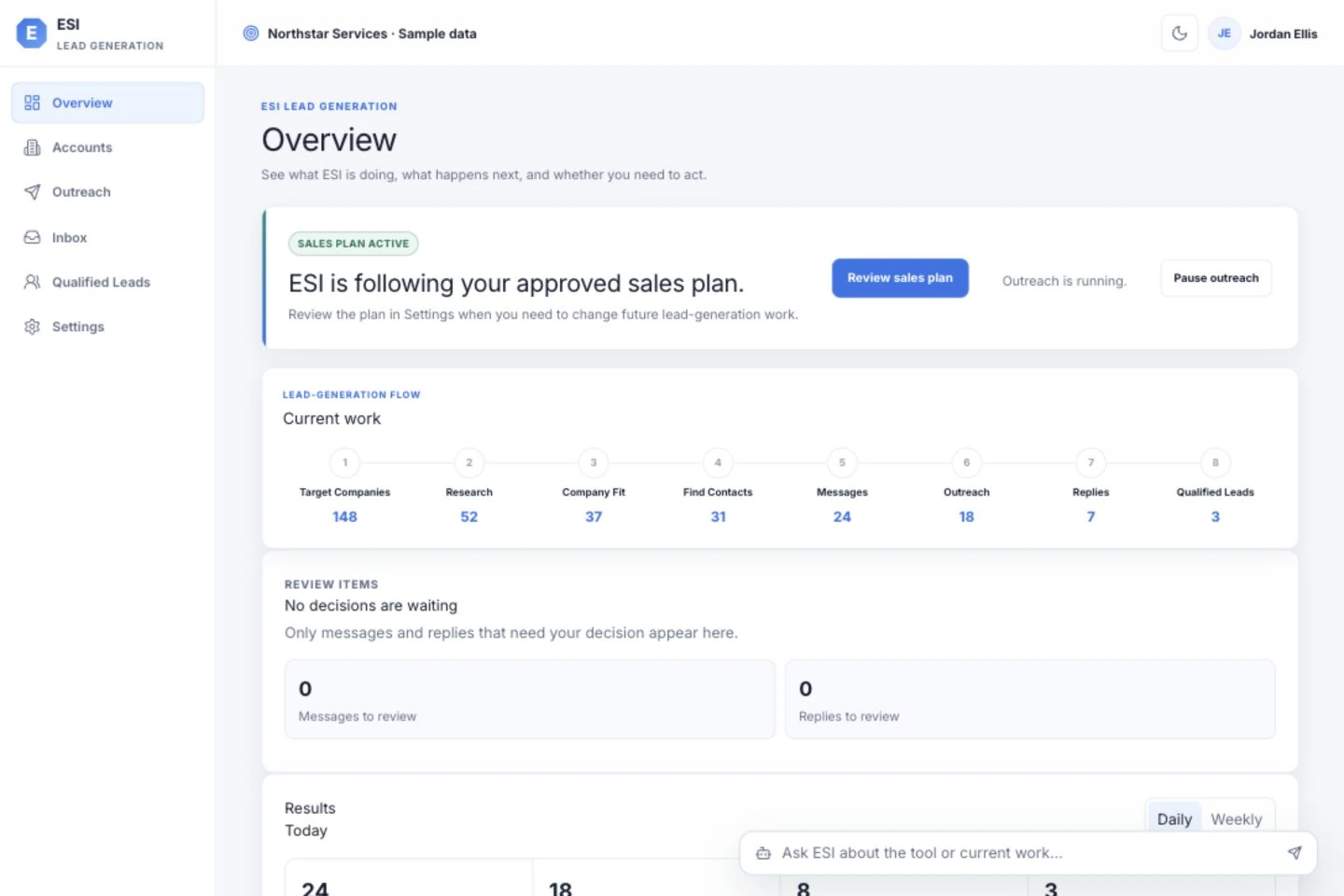
Follow newly discovered companies and your existing targets through research, fit checks, outreach and interest. See where the work stands and which decisions need your attention.

See how company research and the contact’s role shape a clear, professional message in your voice. Review prepared emails and refine the wording when you want to.

Share the contact, why they’re interested, and the conversation so far. Prepare a handoff file for the tools your team already uses.
Product demonstration using sample companies, contacts and outcomes.
Your standards, throughout
Agree the company criteria, buyer roles and exclusions that guide discovery and research. Approve your sales plan before outreach begins.
Follow-up stops when someone responds. Your team handles the conversation.
Your sales leader shares qualified leads. Every rep doesn’t need another dashboard.
Start with the right scope
We’ll define your ideal customer, relevant buyer roles and sales goals, then agree the scope and pricing before you begin.
Define a promising audience and explore it with company discovery, research and focused outreach.
Contact for pricingBuild an ongoing programme of company discovery, precise research and professional outreach to relevant people.
Contact for pricingWork through your operating, technical or handoff needs together.
Contact for pricingGood questions
We start with your offering and agree which companies and buyer roles are a good fit. ESI discovers or researches those companies, then identifies contacts whose responsibilities connect to the problems you solve. Company evidence, role relevance and contact checks guide who to approach and give each introduction a specific purpose.
B2B companies that want help discovering suitable prospects, reaching the right people and starting more relevant sales conversations. A sales leader or named program owner runs the workspace. Sales representatives receive qualified leads outside ESI and continue in their existing tools.
Yes. You do not need a target list to begin. We help define your ideal customer from what you sell, the problems you solve and the markets you want to serve. ESI then discovers and researches companies against those criteria. If you already have a list, ESI can assess those companies and find relevant contacts within them.
Company research and the contact’s role give each message its substance. ESI uses your offering, approved claims and preferred tone to write clear, professional emails with a relevant reason to engage. You can review prepared messages, refine the wording and update the guidance that shapes future outreach.
You approve the sales plan first: targeting, exclusions, message guidance, follow-up and sending rules. Once the plan is active and your email connection is ready, ESI works within that direction. You can review messages, handle exceptions and pause outreach.
ESI identifies and sorts replies and stops follow-up after a response. Your people take the conversation forward. Qualified leads can be exported for your CRM. Custom CRM integrations are assessed case by case and scoped and quoted separately, subject to technical feasibility and your organisation’s data security requirements.
Each client has a separate application environment and database. Your sales information and connections stay inside your environment. Support access is authorized for that specific client. We can review hosting, research sources, email services, retention and your IT or privacy requirements before agreeing a setup.
Your contact details and message are sent to the ESI team’s inbox so we can respond to your enquiry. This website does not save submissions in a database or browser storage, or add you to a mailing list. The email remains subject to the receiving inbox’s retention settings.
Cloudflare processes the request and checks for spam when you open the form. Short-lived rate-limit counters use keyed digests rather than your email or IP address in plain text. Hosting and email providers may retain service metadata under their own policies. Please do not include passwords, customer lists or other sensitive information. You can use this form to ask about access to or removal of your enquiry.
Built around your ideal customer
Tell us what you sell and where you want to grow. We’ll help define a promising audience, discover suitable companies and plan relevant, professional outreach.
No purchase or commitment through this form.
We’ll discuss fit, scope and pricing with you.